The Shopify App Built for Florists & Flower Shops
Built specifically for flower shops, NuFlorist adds delivery rules, card messages, and upsells that Shopify doesn’t support natively.

Cutoff times and blackout dates
Add-ons by occasion
Charge by delivery zone and time slot
Card messages that print
Delivery zones by ZIP or postal code
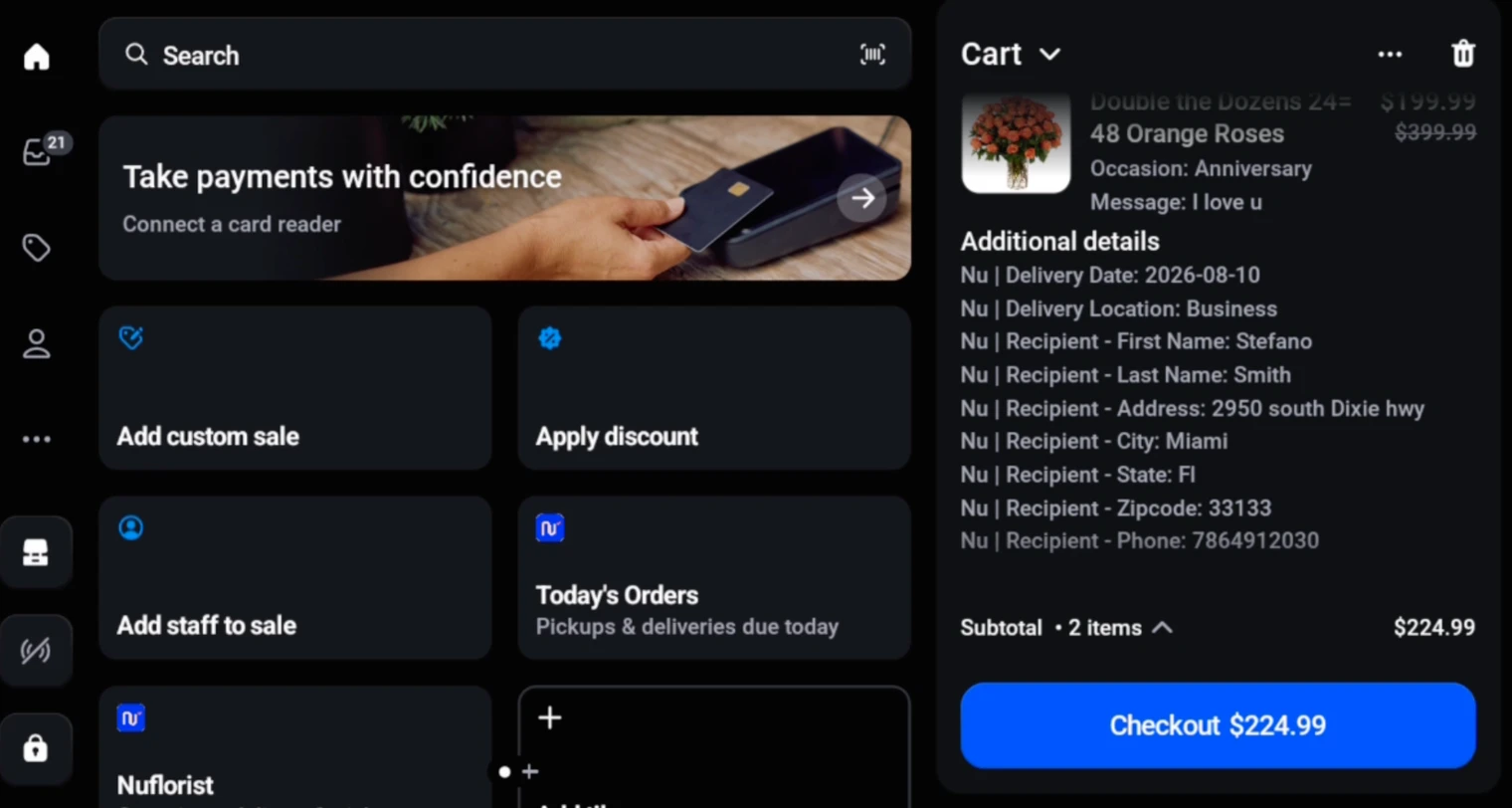
Florist fields inside Shopify POS
Cutoff times and blackout dates
Add-ons by occasion
Charge by delivery zone and time slot
Card messages that print
Delivery zones by ZIP or postal code
Florist fields inside Shopify POS
More control from storefront to flower-shop counter
See the latest delivery, card-message, and Shopify POS workflows—then keep scrolling for the full NuFlorist toolkit already on this page.
What NuFlorist adds to a Shopify flower shop
Increase order value
Structured upsells, delivery upgrades, and add-ons customers understand.
Full control over delivery
Zone, date, time, and product-based delivery rates.
Sections made for florists
Add location type, occasions with addons and message fields into your products.
Add-ons by Occasion
Suggest relevant add-ons based on specific occasions like birthdays or anniversaries, and connect your Shopify collections and create custom experiences for every moment.
- Occasions + Card Messages
- Add-ons on product page


Advanced Delivery
Go beyond basic Shopify settings. Build advanced delivery zones with their own rates, set order cutoff times for same-day and future orders, add delivery and pickup blackout dates, and apply holiday-specific delivery rules. NuFlorist supports U.S. ZIP codes and Canadian postal codes. In the NuFlorist cart-widget flow, the checkout button stays hidden until the configured carrier rate verifies the address as deliverable.
Advanced delivery features require the NuFlorist Pro plan. Delivery rates use Shopify’s third-party carrier-calculated shipping. It is included on Shopify Advanced and Plus; Grow merchants can add it for a monthly fee or by switching to annual billing; Basic does not support it. Checkout-page extensions on Shopify’s information, shipping, and payment pages require Shopify Plus.
- Delivery module on cart page
- Advanced address validation
- Order cutoff times & blackout dates
- U.S. ZIP & Canadian postal codes
- Cart-widget delivery address verification


Shopify Plus Exclusive
Checkout Fields
Add supported florist order fields to product or cart experiences. On Shopify Plus, checkout-page extensions can capture recipient, delivery or pickup, date, time, and instructions on Shopify’s information, shipping, and payment pages.
- Fully customizable design on cart page
- Checkout-level section for Shopify Plus users


Works with Order Printer Pro, a third-party Shopify app. NuFlorist is not affiliated with or endorsed by its developer.
Card-Message Printing
Print the occasion and card message captured at checkout from the NuFlorist Orders page with an editable card template, or through a configured Order Printer Pro template.
- Built-in editable card template
- Uses the occasion and card message saved on the Shopify order


NuFlorist for Shopify POS
NuFlorist is a Shopify POS UI extension for occasion, card message, recipient, delivery or pickup, date, time, instructions, and delivery-fee details. Shopify POS remains the system for catalog, cart, customers, payments, and order creation.
- Occasion, card message, and recipient details
- Delivery or pickup date, time, instructions, and fee


Hana Florist POS
For shops that configure and enable Hana Florist POS (opens in a new tab), NuFlorist sends eligible Shopify order data to the connected Hana account. Delivery depends on the configured integration and provider availability.
- Configured order transfer to Hana Florist POS
- Third-party Hana service terms and availability apply

Why Florists Choose NuFlorist
Flowers require local precision. We built the tools native Shopify is missing.
| Feature | Nuflorist | Shopify Native |
|---|---|---|
| Delivery Date & Time Picker | ||
| Delivery-Time Surcharges by Zone | ||
| Occasion-Based Upsells | ||
| Card Message Presets | ||
| Specific Location Fields | ||
| Order Cutoff Times (Same-Day & Future) | ||
| Delivery & Pickup Blackout Dates | ||
| Holiday Delivery Rules | ||
| Hana Florist POS Integration | ||
| Cart-Widget Delivery Address Verification | ||
| U.S. ZIP & Canadian Postal Codes |

Upsell with Occasions
Upsell products for each occasion easily by linking with your Shopify collections

Suggested Card Messages
Offer message presets for each occasion
Connect to MAS Direct
For Pro shops that configure MAS Direct, NuFlorist can submit eligible wire orders to the MAS Direct Network with recipient, address, and delivery details.

Custom Delivery Rates
Add delivery times, block days when you’re not open and add custom charges to specific scenarios

Fully Customizable
Easily match your store design
Running a flower shop on Shopify meant working around its limits and stacking plugins. We built NuFlorist to put the florist workflow in one app.

Pricing plan
Use configured add-ons and delivery upgrades to increase order value when they fit the order.
What do you get:
- Messages suggestions by Occasion
- Select Occasion type
Pro
Add-ons, delivery zones and rates, checkout blocks, analytics, and integrations for shops that deliver.
$29.99/mo
$350/y
Advanced delivery features require the NuFlorist Pro plan. Delivery rates use Shopify’s third-party carrier-calculated shipping. It is included on Shopify Advanced and Plus; Grow merchants can add it for a monthly fee or by switching to annual billing; Basic does not support it. Checkout-page extensions on Shopify’s information, shipping, and payment pages require Shopify Plus.
What do you get:
- Messages suggestions by Occasion
- Select Occasion type
- Delivery Module (not on Shopify Basic)
- Optional MAS Direct & Hana Florist POS integrations
- Checkout blocks (Shopify Plus only)
List all Included features
| Included features | Pro | Free |
|---|---|---|
| Occasions | Unlimited | Unlimited |
| Card Messages | ||
| Add-ons (Product Page) | ||
| Delivery Module (Cart Page) |
FAQs
NuFlorist exists to help florists charge correctly, sell more per order, and stop fighting Shopify’s limitations.
What is NuFlorist?
NuFlorist is a Shopify app for florists and flower shops. It adds configurable card messages, occasions, delivery rules, add-ons, and florist order fields to supported Shopify storefront and checkout surfaces.
Why do florists need NuFlorist?
NuFlorist adds flower-order details that are not part of a general Shopify setup, including occasion selection, card messages, delivery and pickup rules, delivery zones, and florist-focused product-page blocks.
How does NuFlorist increase revenue?
NuFlorist can help increase order value by presenting configured add-ons and delivery upgrades when they fit the order. Results depend on each shop’s products, pricing, traffic, customers, and configuration.
Can I charge different delivery prices by area?
Yes. Build advanced delivery zones with their own rates by supported ZIP or postal code. In the NuFlorist cart-widget flow, the checkout button stays hidden until the configured carrier rate verifies the address as deliverable. Other checkout paths are governed by their own Shopify and theme configuration.
Does NuFlorist work with Shopify themes?
NuFlorist uses Shopify app blocks designed for Online Store 2.0 themes. Compatibility depends on the theme and configuration, and some stores may need setup adjustments or theme-specific placement.
Does NuFlorist modify checkout?
NuFlorist provides supported app blocks for florist order fields. Product and cart placement depends on the theme and configuration; extensions on Shopify’s information, shipping, and payment checkout pages require Shopify Plus.
How long does setup take?
Setup time depends on the features and configuration a shop chooses, including occasions, card-message settings, add-ons, delivery or pickup rules, postal-code zones, checkout blocks, and integrations.
Is NuFlorist a POS?
NuFlorist is not a standalone POS. It adds a florist workflow extension inside Shopify POS for occasion, card message, recipient, delivery or pickup, date, instructions, and delivery-fee details. Shopify POS still handles products, customers, payments, and order creation.
Is support included?
Yes. Every plan includes email support from the NuFlorist team. Merchants can contact info@nuflorist.com for help with installation, configuration, and product questions.
Does NuFlorist support Canadian and Australian florists?
Canadian postal-code validation is available in the current delivery-zone workflow. Country-specific Australian validation and storefront labels are still being prepared, so Australia is listed as coming soon rather than as a current market claim.
Can I set order cutoff times and blackout dates?
Yes. Configure order cutoff times for same-day and future orders, add delivery and pickup blackout dates, and set holiday-specific delivery rules and availability — so customers can only choose dates and times you can actually fulfill.
Try Nuflorist free for 14 days
Book a demo to see how Nuflorist helps your store to sell more.