Florist Order Fields for Shopify POS
These POS tools are on the NuFlorist Pro plan. NuFlorist adds occasion, card message, recipient, delivery or pickup, date, time, instructions, and delivery-fee fields to Shopify POS.
New at the counter: a walk-in fast path, tap-to-pick delivery windows, customer lookup that fills in the recipient, and a delivery fee filled in from the recipient’s postal code.
- Cutoff times and blackout dates
- Add-ons by occasion
- Charge by delivery zone and time slot
- Card messages that print
- Delivery zones by ZIP or postal code
- Florist fields inside Shopify POS
A walk-in order in three steps
Start in Shopify POS
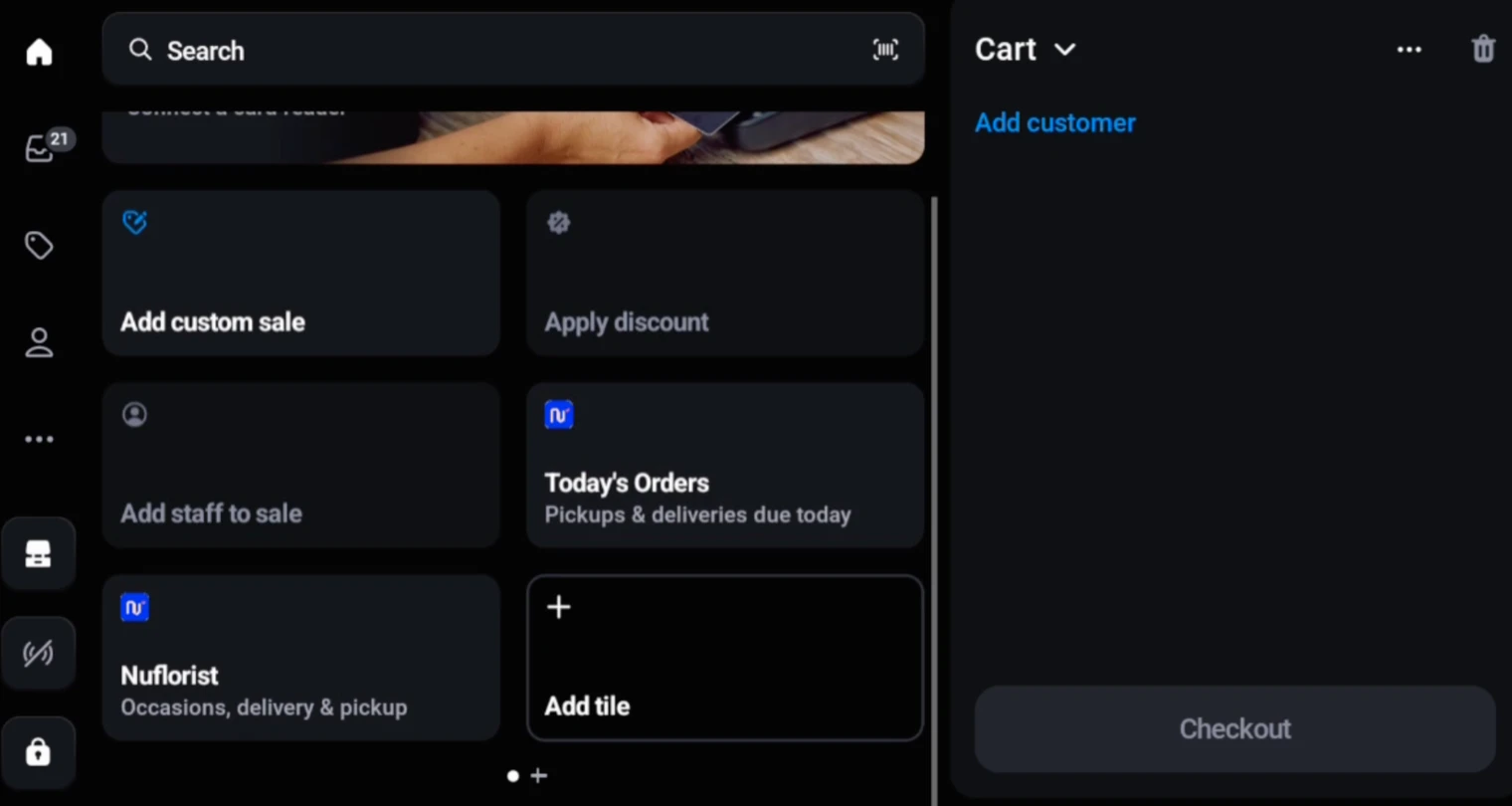
Use Shopify POS to browse products and build the cart. NuFlorist does not replace Shopify POS catalogue, cart, customer, or payment screens; it adds florist-specific fields to the current cart.
Pick the occasion & write the message
Once products are in the Shopify POS cart, open NuFlorist to select a configured or custom occasion, enter the card message, and add recipient and fulfillment details.
Review, pay, and it's done
The NuFlorist summary lets staff confirm florist fields before applying them to the cart. Staff then return to Shopify POS, which owns totals, payment options, receipts, and final order creation.
Florist details inside Shopify POS
These POS tools are on the NuFlorist Pro plan. NuFlorist is a Shopify POS UI extension, not a standalone point-of-sale system. Shopify POS remains responsible for the product catalogue, cart, customer profiles, taxes, payments, receipts, and order creation. NuFlorist opens from the Shopify POS cart and adds the florist-specific information staff need before they return to Shopify POS to complete the sale.
Two addresses, both captured
Without itThe billing address belongs to the buyer and the delivery address belongs to someone else. Generic systems have one field, so the second ends up on a sticky note.
With NuFloristNuFlorist captures the recipient name, delivery address, phone, location type, date, time, and instructions inside its Shopify POS extension.
Card messages saved with the order
Without itThe most emotionally important field in the whole order has nowhere to go, so it gets handwritten and occasionally lost.
With NuFloristStaff type the message in NuFlorist and it is saved on the relevant Shopify cart lines. Every plan can print it from the built-in card template on the Orders page. The Order Printer Pro integration is on Pro.
The occasion travels with the order
Without itWithout one there is no basis for suggesting the vase, the chocolates or the upgrade.
With NuFloristStaff select a configured occasion or enter a custom one. NuFlorist saves it with every relevant cart line so it travels with the Shopify order.
Recipient and delivery details in the order
Without itRecipient and fulfillment details stored on paper or in a separate tool can be missed when the workshop starts the order.
With NuFloristNuFlorist adds the florist fields to Shopify cart lines and order attributes before Shopify POS creates the order.
See it on a real Shopify POS
Florist workflow fields inside Shopify POS
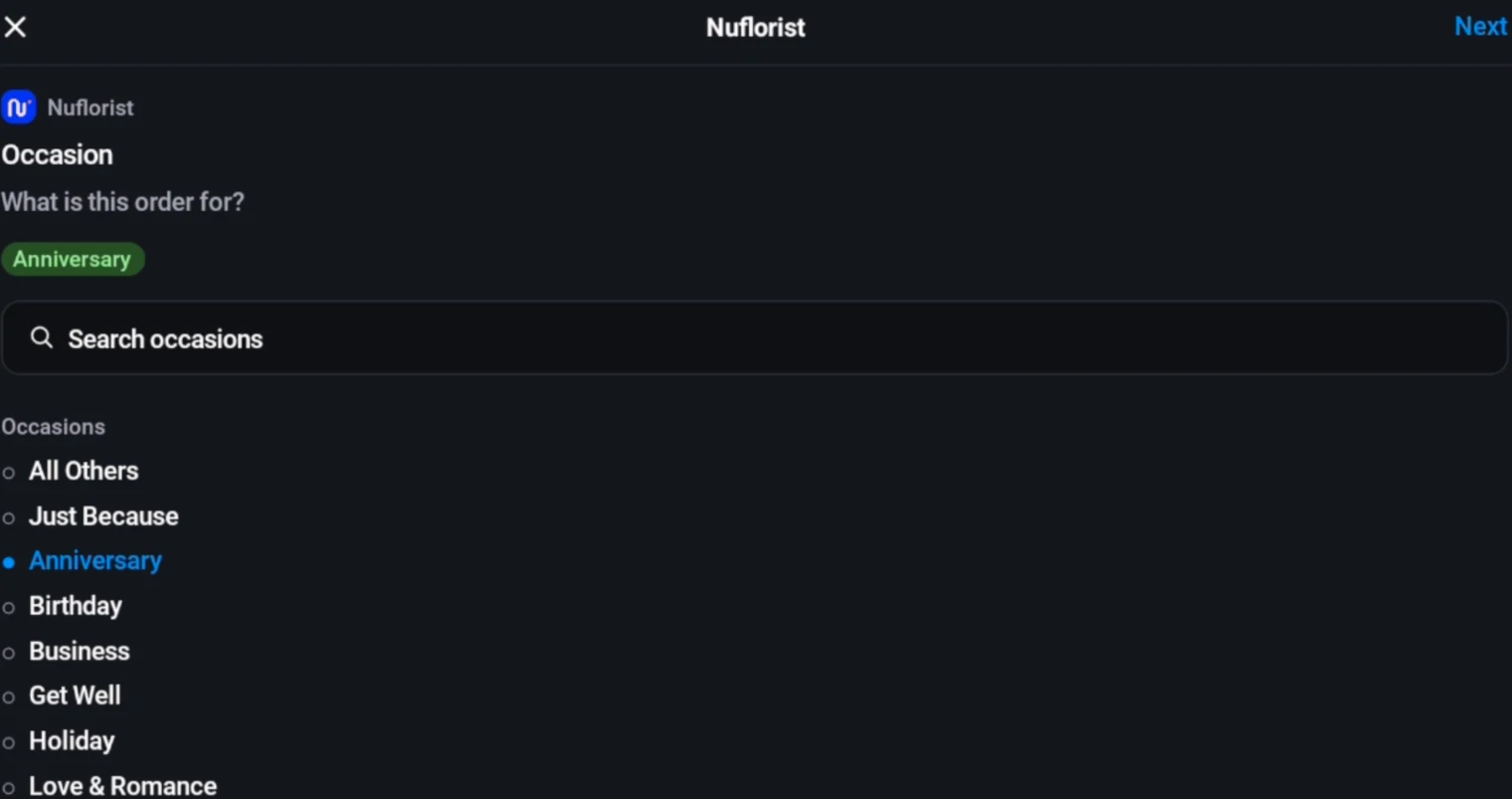
Occasion-first selling
Staff select a configured or custom occasion, and NuFlorist saves it on every relevant Shopify cart line.
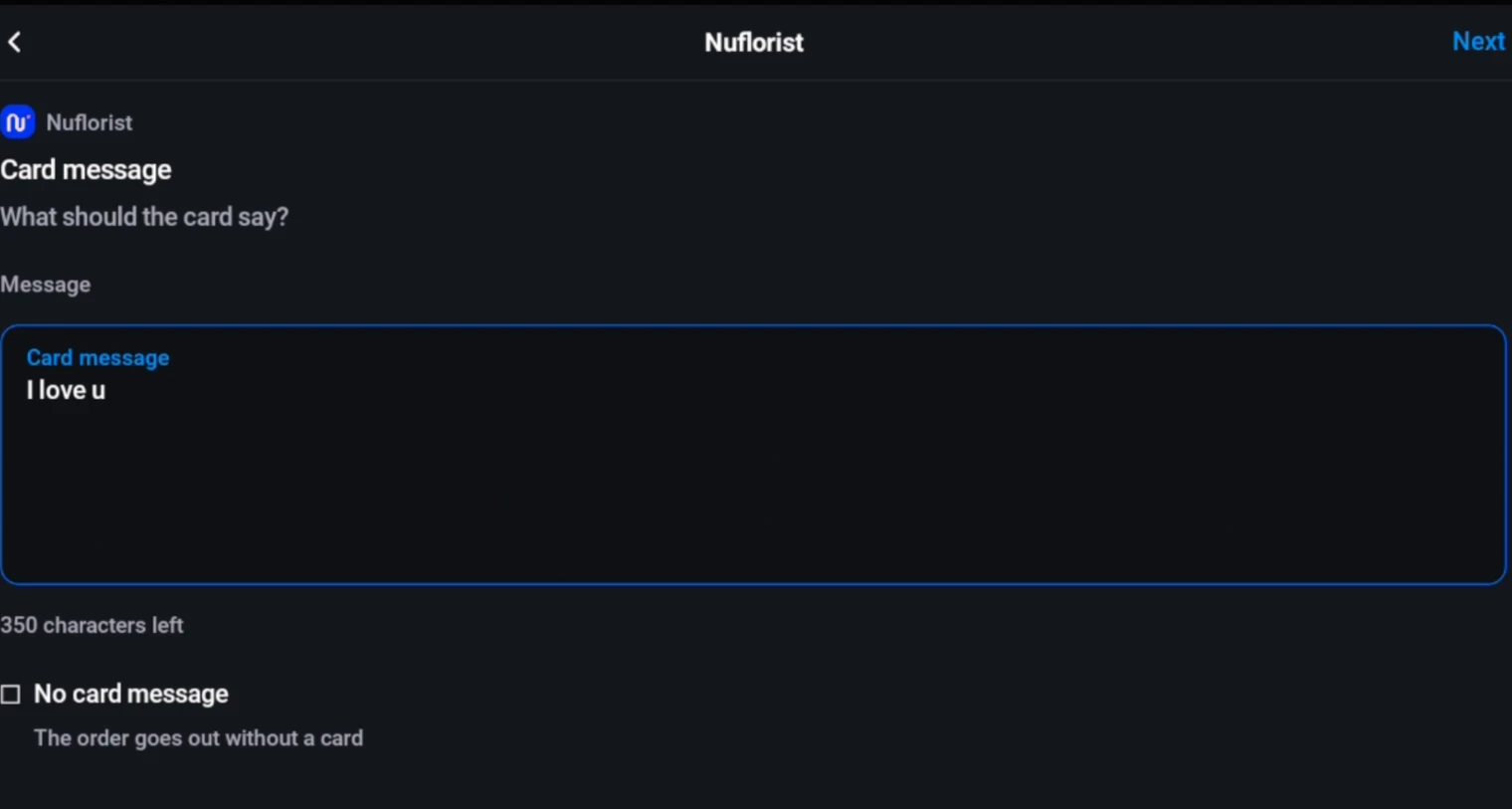
Card message at the counter
Staff capture the card message in the NuFlorist extension and save it to relevant cart lines. Every plan can print it from the built-in card template on the Orders page. The Order Printer Pro integration is on Pro.
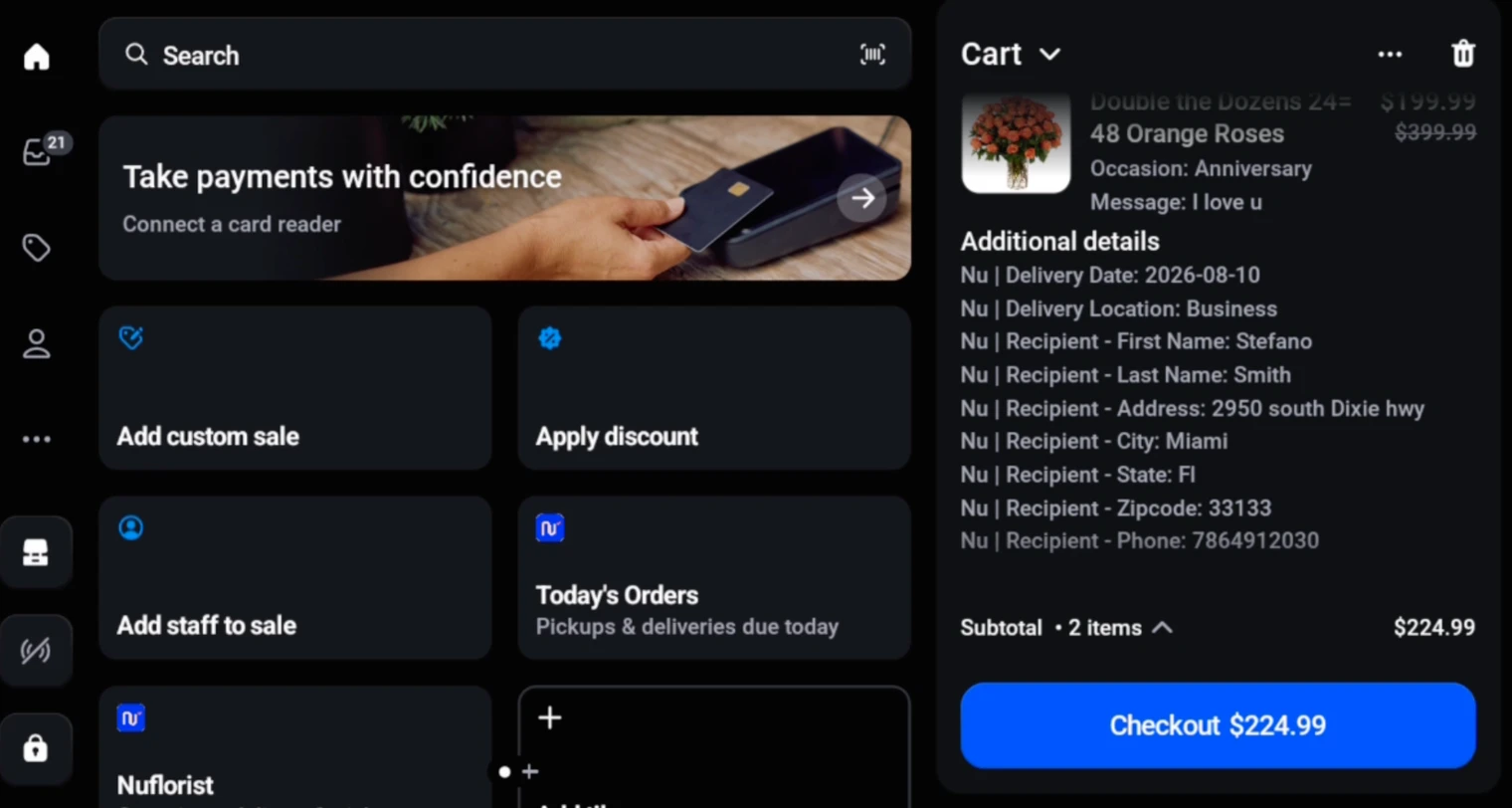
Recipient and fulfillment details
Capture recipient contact and address fields, delivery or pickup, date, time, location type, instructions, and an optional staff-entered delivery fee.
Multi-line cart coverage
Apply occasion and card message to every relevant cart line while adding recipient and fulfillment details to the Shopify cart once.
Shopify POS handles payment
After NuFlorist applies the florist fields, staff return to Shopify POS. Payment methods, terminals, taxes, receipts, and order creation remain Shopify POS functionality.
Stored on the Shopify order
NuFlorist saves florist fields on Shopify cart lines and order attributes so they travel with the order Shopify POS creates.
Already use Hana?
For shops that configure and enable Hana Florist POS, NuFlorist can send eligible Shopify order data to the connected Hana account, subject to provider availability.
A Shopify POS order with NuFlorist
Staff begin in Shopify POS, where they search the shop’s Shopify catalogue, add products to the cart, and select a customer when needed. Those catalogue, cart, and customer screens belong to Shopify POS. Once the products are in the cart, staff open the NuFlorist tile to add the florist workflow.
Inside NuFlorist, staff select a configured occasion or enter a custom one, then type the card message or mark the order as having no message. They choose delivery or pickup and enter the applicable date. Delivery orders can also capture the recipient name, address, city, region, postal code, phone, requested time, location type, instructions, and an optional staff-entered delivery fee.
The NuFlorist summary lets staff review the florist fields before saving. Required fulfillment and date fields are validated, and a delivery address is required for delivery but not pickup. When staff apply the workflow, the occasion and card message are written to every relevant cart line; recipient and fulfillment details are added to Shopify cart attributes; and a valid delivery fee is represented as a separate cart line.
Staff then return to Shopify POS to finish the sale. Shopify POS handles payment methods, terminals, taxes, receipts, inventory updates, customer records, and final order creation. NuFlorist does not claim those native Shopify functions. Every plan can print the card from the built-in template on the NuFlorist Orders page. The Order Printer Pro integration is on Pro.
Common questions
Do I need new hardware?
NuFlorist itself does not add or replace hardware. Shopify POS device, terminal, payment, and plan requirements are governed by Shopify and the payment setup you choose.
Does it use my existing products?
Shopify POS displays your Shopify products and builds the cart. NuFlorist opens against that current cart so staff can add florist-specific details to its relevant lines.
Where do counter orders end up?
Shopify POS creates the order in Shopify. Before checkout, NuFlorist applies occasion, message, recipient, and fulfillment details to the cart so those fields travel with the Shopify order.
Does the card message print?
NuFlorist saves the message to the relevant cart lines. The POS extension does not print the card. Every plan can print from the built-in card template on the NuFlorist Orders page. The Order Printer Pro integration is on Pro.
Can I look up a returning customer?
Customer lookup and purchase history are Shopify POS features, not features supplied by the NuFlorist extension. NuFlorist captures recipient and fulfillment fields for the current florist order.
Does it handle delivery pricing?
In Shopify POS, staff can add a delivery fee through the NuFlorist workflow. Online checkout rates have a separate Shopify plan requirement. Needs NuFlorist Pro. Delivery rates need Shopify’s carrier-calculated shipping (included on Advanced and Plus, an add-on on Grow, not available on Basic). See which Shopify plans qualify.
Still deciding whether to move off your current till? Read how to choose a till for a flower shop, including the fields to write down before you compare anything.
Florist details, inside the Shopify POS you already use
Install free, or try Shop or Pro free for 14 days.