Flower Delivery Pricing: How to Charge by Zone
A flat delivery fee is simple to explain, but longer trips can cost more to fulfill. Compare the fee with your actual costs before deciding whether a flat price or separate zones fit your shop.
Zone pricing is one option to test. Explain the coverage and fees clearly, and measure the response when you change them.
Work out what a delivery actually costs you
Before setting any price, get a real number. For a given run:
- Driver time, door to door, including the wait at the door and the return leg. Measure this directly rather than assuming a typical duration.
- Vehicle cost — fuel, insurance, maintenance, amortised over the miles.
- Failed-delivery risk. Include the cost of repeat attempts using your own delivery records.
- Packing time and materials for transport-safe arrangements.
Record delivery durations across representative busy and quiet periods. Include waiting and return trips so the estimate reflects the work your team actually does.
Use the variation between trips to decide whether separate zones would help.
Draw zones by drive time, not distance
The instinct is to draw concentric circles on a map. Resist it. Five miles across a river with one bridge is not five miles down an arterial road.
Build zones from drive time in your actual traffic, then express them as lists of postcodes so the system can price them automatically. The following four-zone layout is an example to adapt, not a measured industry standard:
| Zone | Typical shape | What it should cover |
|---|---|---|
| Zone 1 | 0–15 minutes | Your immediate neighbourhood. Highest volume, lowest cost per drop. |
| Zone 2 | 15–30 minutes | The bulk of a typical shop's deliveries. |
| Zone 3 | 30–45 minutes | Worth doing at the right price. Often needs batching. |
| Zone 4 | 45+ minutes | By arrangement, minimum order, or not at all. |
Use enough zones to represent meaningful cost differences while keeping the rules manageable for staff.
Price each zone against the cost you measured
Take your measured cost per drop in each zone and add margin. Two rules keep this sane:
Zone 1 should be cheap enough to feel like a local shop. This is your defensible territory. If a customer four streets away pays the same as one across the county, you are inviting a competitor to undercut you where you are strongest.
The far zone should carry a minimum order value, not just a higher fee. A $15 posy going 45 minutes each way is not rescued by a delivery surcharge — the driver time is the same whether the order is small or large. A minimum order value routes that trip to a size that justifies it.
A three-zone Miami example
Here is a simple way to see zone pricing in practice. Our NuFlorist demonstration store uses three sample delivery zones:
| Demo zone | Example ZIP codes | Sample delivery fee |
|---|---|---|
| Miami Central | 33130, 33131, 33132 | $12 |
| Grove and Gables | 33133, 33134, 33146 | $15 |
| Miami Beach | 33139, 33140, 33141 | $18 |
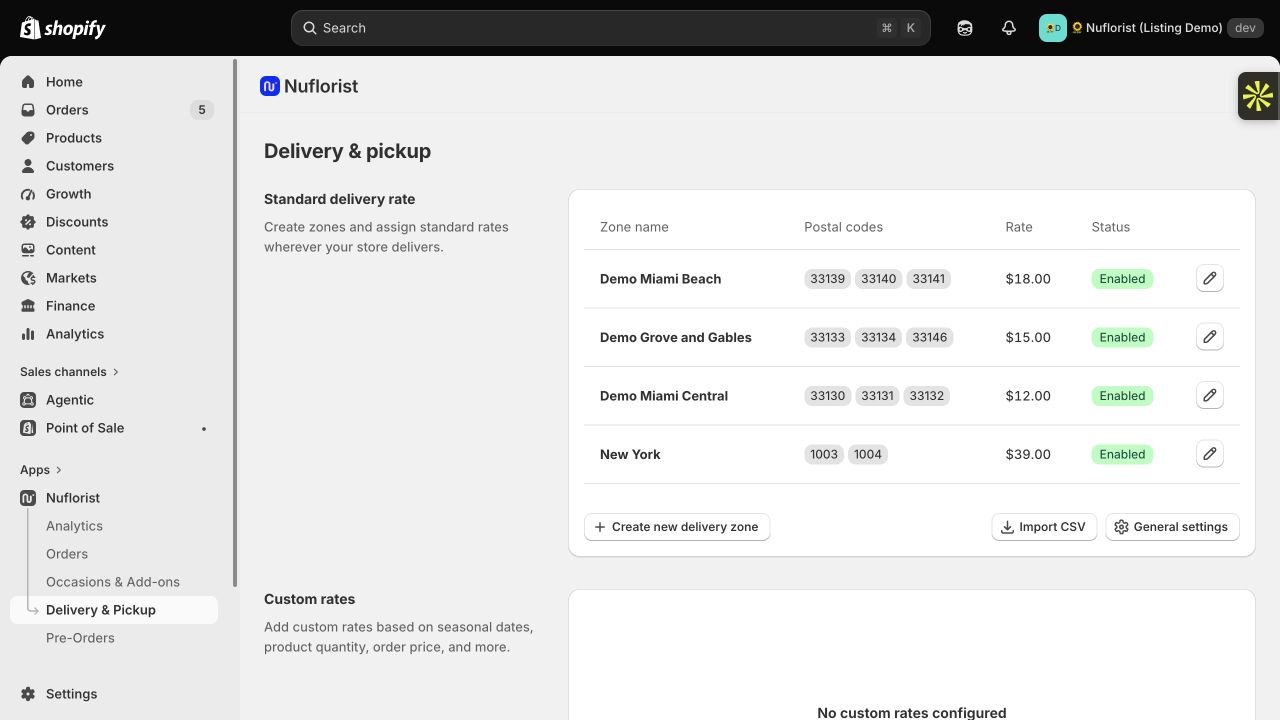
These are demonstration prices, not recommended prices for your shop. Build your own fees from driver time, vehicle costs, packing, and unsuccessful delivery attempts. A ZIP-code list defines coverage; it does not measure traffic or prove that every address in the zone has the same delivery cost.
To test a configuration like this, add an arrangement to the cart, select United States and Florida, and enter a ZIP code. Choose an available delivery date, delivery time, and location type before calculating the fee. In the September 11, 2026 demo test, 33131, 33133, and 33139 returned $12, $15, and $18 respectively. This is historical test evidence, not a fresh checkout result.
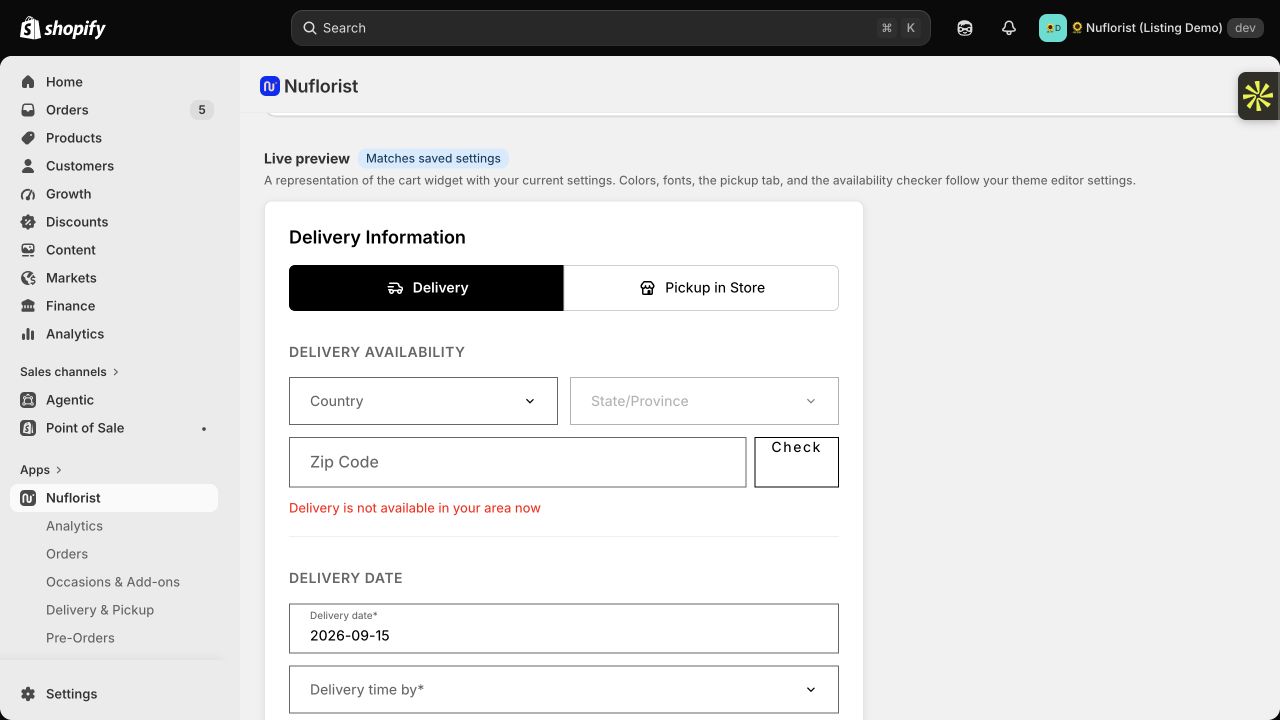
Then test an address outside your zones. In our demo, ZIP 32801 returned no shipping rates and a prompt to verify in checkout. A failed estimate alone does not prove that an order will be blocked. Before launch, use test checkout to confirm the final shipping charge and how your store handles an unsupported address. Check pickup separately; it follows a different fulfillment flow.
Your zones also need a simple maintenance routine. Revisit them when delivery costs change, a road closure changes travel time, or the shop changes its service area. Keep a named person responsible for the ZIP lists and prices.
See the delivery and pickup features for configuration details, or book a NuFlorist walkthrough to review the customer flow and your Shopify plan requirements.
Rush, same-day and timed windows
These are separate charges layered on top of the zone price, because they cost you different things:
- Same-day breaks your production schedule. It is worth a premium because it displaces planned work, not because it travels further.
- Timed windows ("before noon", "between 2 and 4") constrain routing, which is what actually costs money. The narrower the window, the higher the surcharge.
- Sunday and holiday delivery carries a labour premium, and should be priced as one rather than absorbed.
The critical piece is the cutoff, and it must be enforced by the system, not by goodwill. If same-day closes at 1pm, the checkout must stop offering it at 1pm. A customer who buys same-day at 1:15 and does not receive it has been sold something you could not deliver, and no apology recovers that as cheaply as the checkout refusing the sale.
Free delivery, used deliberately
Free delivery is a marketing instrument, not a pricing policy. Possible approaches to evaluate include:
- Free over a certain order value within Zone 1 only. Check whether the extra contribution covers the delivery cost.
- Free delivery on subscriptions or repeat accounts, where the lifetime value justifies it.
Free delivery still has a cost. Check how your product margin or marketing budget covers it before extending the offer to every address.
Show the price before checkout
Show delivery charges and coverage before the customer commits to the order. If you show an estimate, label it accurately and test it against the final checkout charge. Measure whether clearer pricing reduces questions or abandonment in your own store; do not assume a guaranteed conversion increase.
Wire it up so it prices itself
Whether pricing is manual or automated, staff need a current rule and a clear exception process. Test any automation before relying on it during busy periods.
What you want is: customer enters the delivery postcode, the system resolves the zone, applies the zone rate plus any rush surcharge, and enforces the cutoff — the same way whether the order comes through the website, over the phone, or at the counter.
That last clause matters. If your website prices by zone but your counter charges a flat fee out of habit, you have two prices for the same service, and the first customer to notice will tell you about it.
NuFlorist supports delivery zones configured with U.S. ZIP codes or Canadian postal codes and zone-based rates. See the delivery feature details for supported settings and Shopify plan requirements. Test both the cart estimate and the final checkout rate on your own store. Address-verification behavior depends on configuration; do not assume that an unavailable estimate prevents checkout. Shopify POS has a separate staff workflow that should be tested with the same delivery examples before the shop relies on it.
Migrating from flat to zone pricing
Changing delivery prices on an existing customer base needs a light touch:
- Model it first. Run your last three months of orders through the proposed zones. You are looking for how many existing customers pay more, and by how much.
- Set Zone 1 at or below your old flat rate. Compare the effect on existing customers before changing the fee.
- Announce it once, plainly, framed as what it is: local deliveries cost less, long ones cost more.
- Honour standing arrangements for account customers through their current cycle.
Track customer questions and exceptions after the change, and adjust the explanation or configuration when needed.
The measurement that tells you it worked
Track margin per delivery by zone, monthly. Not revenue — margin.
If a zone still loses money, review its price, costs, minimum order and route efficiency. If volume grows, compare other changes before attributing the growth to pricing.
Separating revenue and costs by zone helps you see where delivery contributes margin and where the service needs a different price or operating plan.