How to add delivery dates to your Shopify flower shop
A bouquet for a birthday or funeral has a deadline. Giving the shopper a date field is only the first step: the shop also needs to check whether that date, address, and fulfillment method work together.
This guide explains how to set up a delivery-date flow and test it before launch. A date selected in the cart is not, by itself, proof that checkout will enforce your delivery rules.
Start with the shop's actual calendar
Write down the days you deliver, the same-day cutoff, holiday closures, and any collections that need extra preparation. Confirm the store timezone before testing a cutoff. Keep pickup hours separate from delivery hours so a closed delivery day does not accidentally become a promise of pickup availability.
For example, if your shop stops accepting same-day delivery at 1 p.m., test the same product before and after 1 p.m. in the store timezone. Use that as a test case for your configuration, not as a default cutoff for every florist.
Configure the cart and check the preview
NuFlorist's delivery and pickup settings include date selection, cutoff times, and blocked dates. Review the delivery feature details for the available settings and plan requirements, then apply the rules that match your operation. Confirm Shopify shipping requirements for your store before relying on calculated delivery rates.
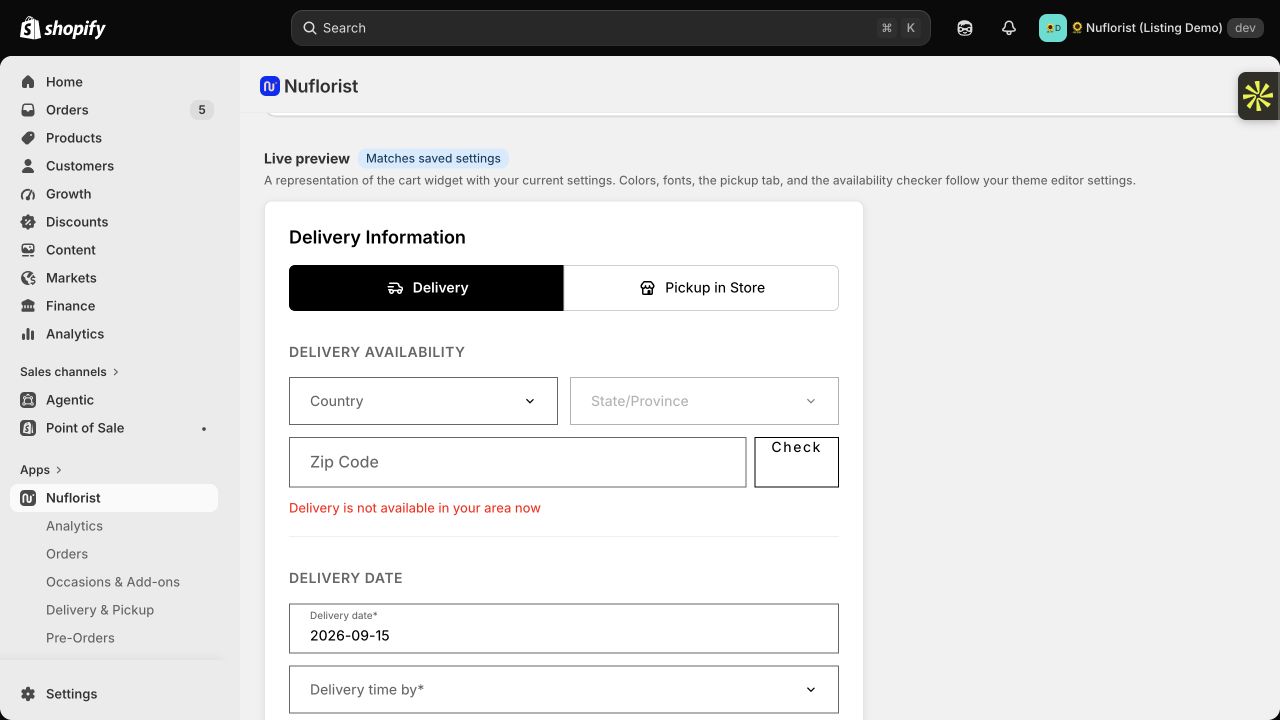
After reviewing the preview, test the installed widget on your storefront. A settings preview does not exercise every theme, cart, or checkout path that a customer can use.
Connect dates to coverage and pricing
Use an address inside each delivery zone and one outside your service area. In our recorded Miami demo test, ZIP codes 33131, 33133, and 33139 returned cart estimates of $12, $15, and $18. These are sample demo rates, not prices recommended for your shop.
For the outside-area ZIP 32801, the demo returned no shipping rates and a prompt to verify in checkout. The Checkout button was still displayed. An unavailable estimate therefore cannot be treated as proof that the customer is prevented from placing an order. No order was placed in that test.
Read the delivery pricing guide for sample zones and a way to build prices from your own costs. Once you configure them, compare the cart estimate with the final shipping charge in a test checkout.
A delivery-date checklist before launch
Record the product, address, store timezone, expected result, and actual result for each test. Use a test order where available; do not charge a real customer to check a configuration.
| Test | What to confirm |
|---|---|
| Same-day order before and after cutoff | The offered date follows your configured cutoff in the store timezone. |
| Blocked holiday or collection date | The affected product cannot select the blocked date through the tested flow. |
| Address inside each zone | The selected date remains valid and the final checkout charge matches the intended zone rate. |
| Address outside all zones | Check the actual checkout outcome; a missing cart estimate is not enough. |
| Switch from delivery to pickup | Pickup date and hours are correct and the delivery fee does not carry over unexpectedly. |
| Mobile cart and any accelerated checkout you offer | The intended date and address checks still apply through each available path. |
| Completed test order | The selected date and fulfillment details reach the order and are visible to the staff preparing it. |
If a flow fails, record the exact step and resolve it before offering that service to customers. Repeat the affected tests after changing your theme, delivery settings, or shipping configuration.
Keep the promise manageable
When a test fails, start with one product and one address. Note whether the problem first appears in the calendar, the rate estimate, the transition to payment, or the saved order. Change one setting at a time and repeat the same case so you can tell which change affected the result.
Then try a mixed cart: combine a product available today with one from a collection that needs more preparation. Decide what your shop intends to offer for that combination before testing it. If the result does not match that policy, resolve the configuration or explain the limitation clearly before launch. Also test a return visit to an existing cart after the cutoff has passed; a date that was valid earlier may no longer fit your schedule.
Assign someone to update closures and cutoffs before busy holidays, and give staff a way to spot missing or conflicting delivery details. Calendar configuration supports that routine; it does not replace checking your shop's capacity.
Book a NuFlorist walkthrough to review your delivery-date flow, or install NuFlorist from the Shopify App Store and test it on your own store.